

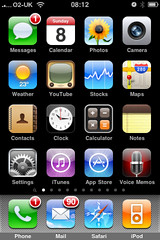
 This could well be of little interest to anyone, but, in the first of a short series, I thought I’d do a quick rundown of the many apps I’m currently giving house room to on my iPhone, one screen at a time.
Screen One
Not that much to say about the main home screen as most of these apps are fixed and shared by everyone. You’ll see that I’ve left the fixed bar at the bottom of the screen untouched. It’s tempting to swap in a Twitter application or even Spotify but the fact is, I access Phone, Mail, Safari and my iTunes library just as much.
Some brief comments on the rest. Messages I do actually use although I never ever get anywhere near to the limit of my bundled free texts from O2. I used to have a separate paid-for and pre-loaded MMS app before it got bundled into the OS as standard but occasionally I now use Messages to send pictures to people who don’t regularly access Twitter, Flickr or email.
Calendar is pretty rudimentary, although it is hooked into my Google Calendar. However, my Google Calendar isn’t synced to my work’s Lotus Notes/Blackberry calendar as corporate security wrappers put this firmly in the ‘too hard’ box. Therefore, this calendar tells me everything I’m doing at evenings and weekends, but gives no clue as to where I am or what I’m doing during weekdays. This is less than ideal as you can imagine. I suppose it’s my fault for being Timmy Two Phones.
Photos - I currently have 1051 photographs in here dating from my very first iPhone. They’re backed up elsewhere but I keep them here as they tell quite a nice chronological story which is good for the odd peruse when bored. As well as photographs I’ve taken, are others I’ve tinkered with using ‘photoshop’ type apps (of which, more later), pictures I’ve saved from the web, screen-grabs and email attachments.
Camera – well my iPhone is a 3G not a 3GS, so I needn’t detail the constraints here. Recent software upgrades have, I think, made the camera even slower to open up and operate than ever. Newer apps which really require a 3GS such as barcode scanners and business card scanners are a bit frustrating so I recently bought a Griffin Clarifi case for the phone which incorporates a neat little close up lens which slides across the main camera lens. This is a surprisingly effective and, given the limited range of new toys associated with the 3GS, represents a reasonably economical alternative upgrade.
Weather – I rarely consult this. Right now have have forecasts set up for Holmfirth, Huddersfield, Manchester, Liverpool, Holy Island, Blackpool, Birmingham and Ashford.
YouTube – I don’t often use this, mainly because of the frustrating lack of rural broadband bandwidth BT bless me with at home. If a ‘tinyurl’ in a tweet opens up this app, I tend to close it down before it starts.
Stocks – Whenever I’ve been given shares I’ve always sold them straight away as I consider them to be added stress. Therefore, I don’t have a great deal of personal interest in this app. It’s reasonably well done though so I’ll sometimes use it to look into the performance of companies I’m researching or who I’m working for or with.
Maps – Yes I use this pretty regularly, often for directions to and from West Yorkshire’s various junior football pitches. Google Streetview will grow increasingly essential as it becomes mashed-up into other augmented reality applications but, for now, I don’t often use it.
Contacts – I use this. Not much to say. My business card scanner apps integrate with it.
Clock – Yes, alarms. No surprises.
Calculator – I use this occasionally but often forget it’s there and fire up the rubbish Windows 3.1 calculator which still pollutes Vista on my laptop. I never use the scientific view which presents itself in landscape.
Notes – I do use this occasionally for shopping lists and the like, but I dislike the cutesy design. I prefer Evernote, but don’t necessarily need perpetual multi-device access to ‘Eggs, milk, toothpaste, Cheryl Cole CD’.
Settings – I’m in here quite a lot. It’s frustrating how some apps have all their mechanics in here whilst others handle it all in-app.
iTunes – I seem to be using this much less than I used to. I tend to browse favourite categories for new releases which I then scout for on Spotify. I used to buy and download straight to iPhone but regularly lost these tracks when syncing with my laptop which was a pain to resolve, so I don’t bother now, unless it’s a current podcast which is free and I don’t care about losing.
AppStore – I browse this place more than I even used to peruse the iTunes store. I’m forever scouting just-released apps esp in the Social Networking, Utilities, Productivity, Music and Photography sections amongst all others. I frequently acquire free/cheap apps to have a play. Few of them stick around for long. They all used to be 'for peanuts' and quick to download, now some are prohibitively expensive or prohibitively huge in terms of file size.
Voice Memos – I rarely use this as, prior to its inclusion in the standard OS I’d already acquired a pretty decent voice recorder which I prefer. Mrs D uses this on her iPhone… she recorded a script she need to deliver at an audition and relistened to it as a means of rehearsing on the fly.
Next... Screen Two.


 Posts
Posts



