Sunday, 8 November 2009

I Think I'll Call You... Appetite

0 comments
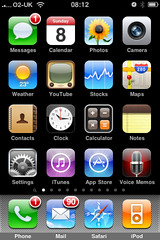
This could well be of little interest to anyone, but, in the first of a short series, I thought I’d do a quick rundown of the many apps I’m currently giving house room to on my iPhone, one screen at a time.

Screen One

Not that much to say about the main home screen as most of these apps are fixed and shared by everyone. You’ll see that I’ve left the fixed bar at the bottom of the screen untouched. It’s tempting to swap in a Twitter application or even Spotify but the fact is, I access Phone, Mail, Safari and my iTunes library just as much.

Some brief comments on the rest. Messages I do actually use although I never ever get anywhere near to the limit of my bundled free texts from O2. I used to have a separate paid-for and pre-loaded MMS app before it got bundled into the OS as standard but occasionally I now use Messages to send pictures to people who don’t regularly access Twitter, Flickr or email.

Calendar is pretty rudimentary, although it is hooked into my Google Calendar. However, my Google Calendar isn’t synced to my work’s Lotus Notes/Blackberry calendar as corporate security wrappers put this firmly in the ‘too hard’ box. Therefore, this calendar tells me everything I’m doing at evenings and weekends, but gives no clue as to where I am or what I’m doing during weekdays. This is less than ideal as you can imagine. I suppose it’s my fault for being Timmy Two Phones.

Photos - I currently have 1051 photographs in here dating from my very first iPhone. They’re backed up elsewhere but I keep them here as they tell quite a nice chronological story which is good for the odd peruse when bored. As well as photographs I’ve taken, are others I’ve tinkered with using ‘photoshop’ type apps (of which, more later), pictures I’ve saved from the web, screen-grabs and email attachments.

Camera – well my iPhone is a 3G not a 3GS, so I needn’t detail the constraints here. Recent software upgrades have, I think, made the camera even slower to open up and operate than ever. Newer apps which really require a 3GS such as barcode scanners and business card scanners are a bit frustrating so I recently bought a Griffin Clarifi case for the phone which incorporates a neat little close up lens which slides across the main camera lens. This is a surprisingly effective and, given the limited range of new toys associated with the 3GS, represents a reasonably economical alternative upgrade.

Weather – I rarely consult this. Right now have have forecasts set up for Holmfirth, Huddersfield, Manchester, Liverpool, Holy Island, Blackpool, Birmingham and Ashford.

YouTube – I don’t often use this, mainly because of the frustrating lack of rural broadband bandwidth BT bless me with at home. If a ‘tinyurl’ in a tweet opens up this app, I tend to close it down before it starts.

Stocks – Whenever I’ve been given shares I’ve always sold them straight away as I consider them to be added stress. Therefore, I don’t have a great deal of personal interest in this app. It’s reasonably well done though so I’ll sometimes use it to look into the performance of companies I’m researching or who I’m working for or with.

Maps – Yes I use this pretty regularly, often for directions to and from West Yorkshire’s various junior football pitches. Google Streetview will grow increasingly essential as it becomes mashed-up into other augmented reality applications but, for now, I don’t often use it.

Contacts – I use this. Not much to say. My business card scanner apps integrate with it.

Clock – Yes, alarms. No surprises.

Calculator – I use this occasionally but often forget it’s there and fire up the rubbish Windows 3.1 calculator which still pollutes Vista on my laptop. I never use the scientific view which presents itself in landscape.

Notes – I do use this occasionally for shopping lists and the like, but I dislike the cutesy design. I prefer Evernote, but don’t necessarily need perpetual multi-device access to ‘Eggs, milk, toothpaste, Cheryl Cole CD’.

Settings – I’m in here quite a lot. It’s frustrating how some apps have all their mechanics in here whilst others handle it all in-app.

iTunes – I seem to be using this much less than I used to. I tend to browse favourite categories for new releases which I then scout for on Spotify. I used to buy and download straight to iPhone but regularly lost these tracks when syncing with my laptop which was a pain to resolve, so I don’t bother now, unless it’s a current podcast which is free and I don’t care about losing.

AppStore – I browse this place more than I even used to peruse the iTunes store. I’m forever scouting just-released apps esp in the Social Networking, Utilities, Productivity, Music and Photography sections amongst all others. I frequently acquire free/cheap apps to have a play. Few of them stick around for long. They all used to be 'for peanuts' and quick to download, now some are prohibitively expensive or prohibitively huge in terms of file size.

Voice Memos – I rarely use this as, prior to its inclusion in the standard OS I’d already acquired a pretty decent voice recorder which I prefer. Mrs D uses this on her iPhone… she recorded a script she need to deliver at an audition and relistened to it as a means of rehearsing on the fly.

Next... Screen Two.

Stephen Carver at the Agile Business Conference

0 comments
Those who attended this year's Agile Business Conference were treated to a phenomenal keynote presentation from Cranfield's Stephen Carver who brought to life the problems faced by project and, separately, programme managers through an extended analogy with flight. The session integrated Battle of Britain strategy featuring an analogue intranet for the first time!, with the ups and downs of commercial airliners and Stephen even got delegates making their own paper aircraft for an 'end-of-session' flight test.

Here are some AudioBoo clips of Stephen's session including a brief interview.

Listen!

Listen!

Listen!

Listen!

Thursday, 22 October 2009

Same Difference

0 comments
Here's me delivering an evolving version of a presentation I've been presenting to different audiences for a while now. Hey, nothing wrong with reuse! It's surprising just how Social Technologies and their application loop throughout so many discussions right now. Plus, it is interesting that they can just as easily be used to knit together teams, communities, families and culture whilst injecting pace, rigour and control into business projects.

So, whilst I was talking AudioBoo, geo-location, hashtags and Twitter to a predominantly financial services audience, James Clay ( ALT Learning Technologist of the Year 2009 ) was talking about Mobile Learning at the BECTA LSIS Embracing Technology Conference to an audience drawn mainly from education.

There's an audio stream of James' talk on his blog. It a fun listen. Despite the difference in subject matter and audience, there are a number of common themes.

Photo Credit: Benjamin Ellis

Sunday, 11 October 2009

Get Ready

1 comments
Busying myself pulling together various threads ahead of this week's Agile Business Conference and AgileCamp events.

I'm parking my presentation here for safekeeping whilst I get other things moving:

Friday, 4 September 2009

Current Issues In Arts & Media

0 comments
Maria Barrett asked me on Twitter if I had a take on current issues in arts and music management. Not really, but I like a challenge. Did a quick brainstorm over a cup of tea using bubble.us... see below. I'll have missed loads but hey it's a collaborative tool so sign up for bubble.us, let me know here in the comments and I'll open up collaboration so you can improve on this start.


Saturday, 11 July 2009

The Cutting Room Experiment

0 comments
Jon and Ben from Cahoona have made their Social Media Cafe presentation available...

Friday, 10 July 2009

New Adventures in Eye-Fi

5 comments
@technicalfault and @paulie asked what my experiences with an Eye-Fi card were and I had more than 140 characters on the subject so here goes.

I bought a 2gb Eye-Fi Explore SD Card from eBay a few weeks ago. It arrived in a sealed pack sitting inside its own USB connector. When I plugged it into the PC it was instantly recognised, but when it fired up the browser to connect me to eyefi.com to register and configure the settings it told me that it had a known fault and it was impossible to register, configure or otherwise use. Doh!

However, the site captured my name and address and committed to send a replacement f.o.c. within a few days from the States. This replacement duly arrived and I was able to register it straight away and configure it.

(Config is about telling it your router's WEP key, setting up a directory to dump pictures into when it's near youe network and giving it your Flickr (or similar) login details should you wish it to automatically post stuff there. You can also input your Twitter details so that it sends you a DM to let you know when it's started uploading photos and when it's finished.)

If you don't want it to automatically send all you pictures to Flickr you can configure it only to upload photographs that you have "protected" in your camera's settings.

Once you're configured, you just need to set your camera so that it doesn't automatically switch itself off after a couple of minutes and, provided you're within range of your network it starts uploading your pictures.

In theory, provided your camera is on, it should start uploading pictures whenever you're in range of an open wifi network but I've never experienced this and remain to be convinced.

Anyhow, the Eye-Fi card works fine in my little Fuji Finepix Z20fd. However, I was also hoping to use it in my old trusty Canon EOS 300D, which actually takes Compact Flash cards. So when I bought my Eye-Fi card I also bought a converter so that I could slide an SD (or SDHC) card into a CF shaped adaptor and use it in my Canon. The good news is that the adaptor works, in that I can take photographs and they are saved on the SD card. However, the automatic upload functionality of the Eye-Fi card don't seem to work whilst it's in the Canon even if I set it so that it doesn't switch off automatically and where I opt to 'protect' selected frames.

A point to be aware of is that it does takes a long time to transfer the photographs from my Fuji, so if you take a lot of photographs like me do opt for the 'protect' option and be selective about which ones you want to upload in this way. Either way, it's a real battery drainer. I always carry two spare batteries with me along with the one in the camera and I've sat and watched it drain all three and still not be finished uploading.

Given that I've not really seen it work on an open wifi network, I'm only using it at home and, frankly, it's quicker, cheaper and greener to take the card out of the camera, bang it into the PC and whizz all the pics across in seconds/minutes than go through all of this palaver. It would be useful if I could set it up to recognise networks at friends', family, the office etc, but to configure this I'd need to input all the individual WEP keys and, as the config is done on the laptop, I'd need to trail it round to everywhere to set it up before I ever might want to upload from the camera 'in real life'.

So on balance, I like the Eye-Fi card in principle but they're expensive (£80ish) , faffy and, given that SD cards are pretty cheap, I don't think they currently offer huge convenience or represent value for money (but I'd love other's views - @spooons?).

Furthermore, chatting to @documentally about them, he tells me that a friend of his had some problems with one breaking inside his camera... the plastic does seem a tad more brittle than a conventional SD card... so if you're going to have a dabble... take care.

Wednesday, 8 July 2009

SMC at the BBC

3 comments
Last night saw Manchester's Social Media Cafe take another step forward as it tried out another new venue thanks to Ian Forrester (@cubicgarden) who'd arranged for the event to take place in the bar of BBC Broadcasting House on Oxford Road.

The venue enabled the parallel sessions from Joelly Black (@thecharmquark), Dan Donald(@hereinthehive), Ben and Jon from Cahoona (@ben_cahoona, @jonthebeef) to take place in clearly defined areas so that attendees could easily settle into the session of their choice or, like me, take a tour around all three.

Each session was well attended and opened up into broad ranging discussions immediately afterwards. This bit is always the best part - it's encouraging for the speakers and it also keeps the subject matter open-ended and free-flowing.

Speaking of free-flowing, the subsidised bar was busy all night and as the sessions wound up, the emphasis reverted to the S of SMC for a little while whilst preparations got under way for the next stage of evening.

Maria (@marialittlestar)from Littlestar had co-ordinated the production of #thejoyofceefax - a short film "crowdsourced" from Twitter-based conversations, through filming by individual contributors right through to its premiere at the Social Media Cafe. Before, the attendees could settle down to watch it though, we made time for a game of Ceefax Bingo as prepared by Dave Mee (@davemee). The crowd were issued with bingo cards each featuring 'random' page numbers selected from the Ceefax, Teletext and FourText archives.

With thousands of numbers to go at, it took a while for anyone to get a line, although Chi-chi Ekweazor ( @realfreshtv) did put in a fraudulent claim at one stage (see the video evidence below). Eventually the highly sought after Ceefax buns, which were put up as prizes, were shared by two eager winners.

So it was onto #thejoyofceefax film at last... a lighthearted look at people's memories of soon-to-be-no-more analogue teletext. @innovationmcr suggested that it would convert easily into an episode of Creature Comforts from Ardman Animations and I know what they mean. As it is, it's a neat little artefact in itself and I'm pleased to have contributed. I hope to share it here when @marialittlestar puts it up onto YouTube later on.

In the meantime, enjoy some photographs and video of last night's event.

[By the way, I bumped into that Rufus Wainwright on the steps of Broadcasting House. He asked me where everyone was heading, so I told him #smc_mcr. He was keen, but I informed him that his name wasn't on the list. Next time, eh? Use the wiki like everyone else mate. ;) ]